
For Australian trade businesses
Books you can do at smoko.
Quotes, invoices and your cash-book, built for tradies.
SmokoBooks runs on your Windows PC. Send branded quotes and invoices, track every job and payment, log expenses, and know what to put aside for GST and tax. No accounting degree required.
- Key emailed instantly
- Works offline
- Cancel any time
- Your data stays local
- GST & BAS ready
- Made in Australia
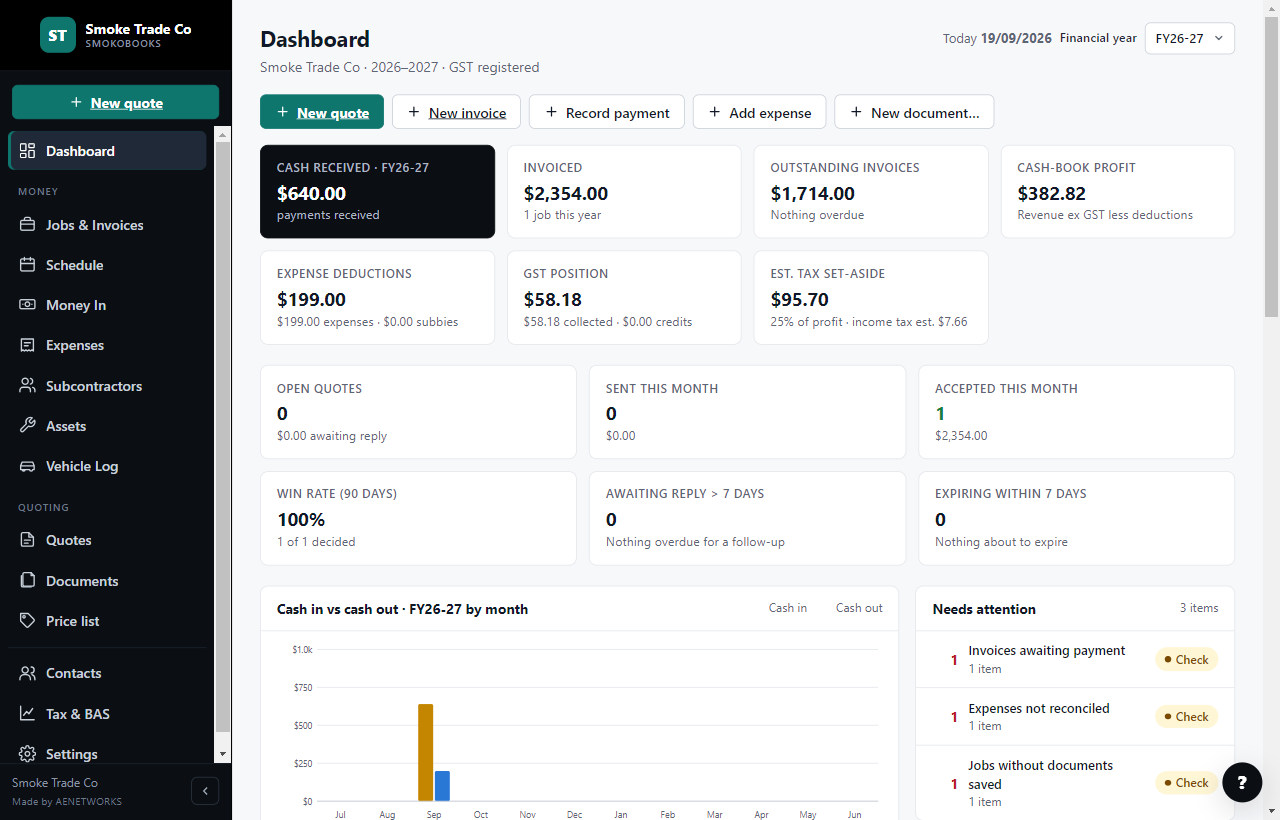
Everything a small trade business needs
Stop juggling a spreadsheet, a Word template and a shoebox of receipts.
Quotes that don't get forgotten
Draft, sent, accepted, declined, expired. See what's awaiting a reply, what's about to expire, and your win rate. Send follow-ups from the app.
Jobs and invoices, linked
Every job carries its quote, invoices, payments and documents. Deposit, progress and final invoices. Part-paid and overdue at a glance.
Money in, money out
Record payments against invoices, log expenses with receipts, track subcontractor costs, assets and your vehicle log.
Tax & BAS without the spreadsheet
Monthly and quarterly summaries of cash received, GST collected and credits, expense deductions and an estimated amount to set aside for tax.
Nine branded documents
Quote, invoice, receipt, work order, variation, defect notice, service report, safety check and SWMS. Your logo, ABN and bank details on every page.
Price list and schedule
Keep your standard items and rates ready to drop into quotes. Book jobs on the schedule and see what's unscheduled.
Your data stays on your PC
Everything is saved on your own computer with automatic daily backups. Export the lot to an Excel workbook whenever you or your accountant want it.
Set up in minutes
A guided setup asks for your business details, logo, GST and bank details. A built-in tour and help panel walk you through the rest.
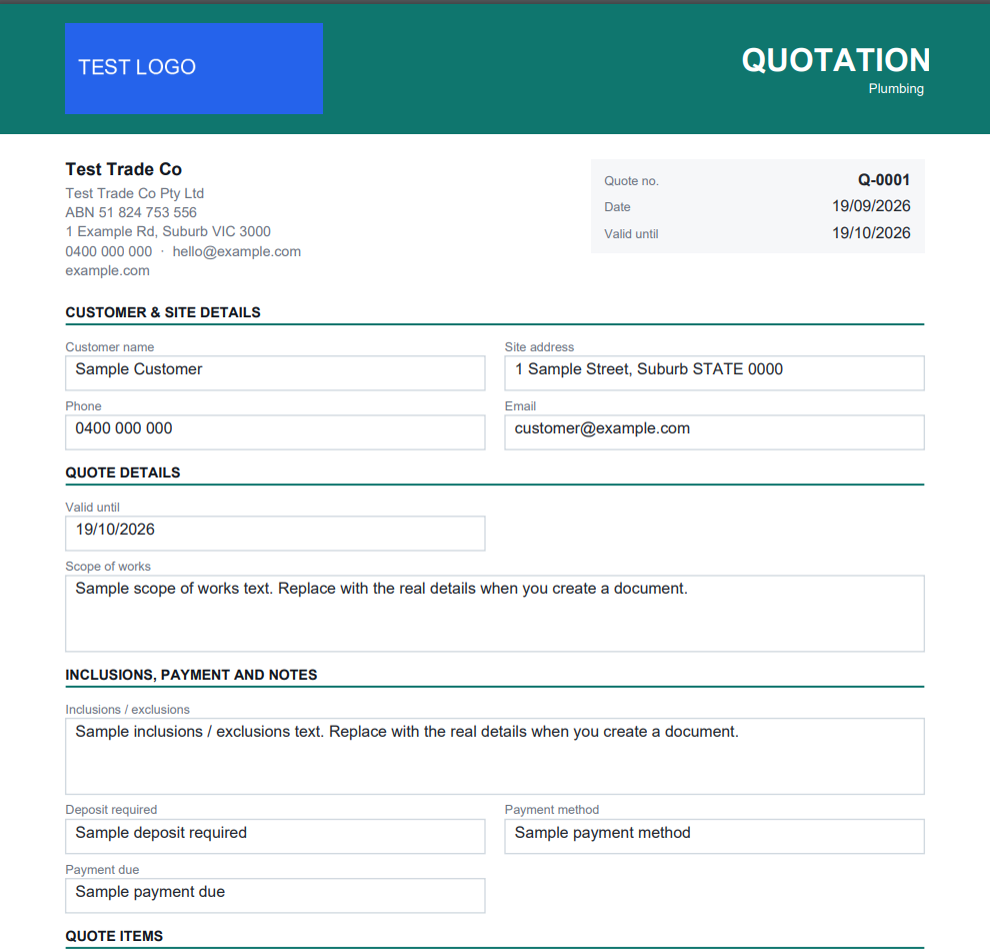
Documents your customers can act on
Nine professional PDFs, branded to your business.
Add your logo and colours once. Every quote, invoice and job document comes out looking like it came from a bigger company. Quotes include fill-in acceptance fields so customers can sign off without printing anything. Email them straight from SmokoBooks, or save the PDF.
- Quote
- Tax invoice
- Receipt
- Work order
- Variation
- Defect notice
- Service report
- Safety check
- SWMS
Have a look around
Clear screens, no clutter.
Three-minute tour
See SmokoBooks do a real job, start to finish.
Setting up a business, sending a quote, turning it into an invoice, recording the payment and the expenses, then checking what's owed at BAS time. This is the same tour that plays inside the app.
Up and running today
Three steps. About ten minutes.
- 1
Choose a plan
Pay securely by card with Stripe. Your licence key appears straight away and is emailed to you with the download link.
- 2
Install SmokoBooks
Run the installer on your Windows PC. The guided setup asks for your business name, ABN, logo, GST status and bank details.
- 3
Enter your key
Paste the key at the licence step and you're in. Send your first quote before the kettle boils.
Simple pricing
Less than a carton a month.
Every plan has every feature. Pick how many computers, and how you'd rather pay.
One computer. The tradie's laptop or the office PC.
That's $15.83 a month — save $38 a year.
- Everything in SmokoBooks
- 1 computer
- Daily backups and Excel export
- Every update while subscribed
- Email support
Two computers sharing one set of books — you on site, someone in the office.
That's $24.17 a month — save $58 a year.
- Everything in SmokoBooks
- 2 computers, same quotes, invoices and expenses
- Books live in your OneDrive, Google Drive or Dropbox
- One person works at a time; the other computer picks up the changes
- Daily backups, Excel export, updates, email support
Prices in Australian dollars. Payments are handled by Stripe; we never see your card. Not for you? Email us within 14 days of your first payment for a full refund. Need more than two computers? Email admin@aenetworks.com.au.
Questions tradies ask us
What computer do I need?+
A PC running Windows 10 or 11 (64-bit). SmokoBooks is a desktop program, not a website, so it opens instantly and works on site without reception.
Does it need the internet?+
Only to activate your key and for a quick daily licence check. If you're offline it keeps working for 14 days before it asks you to reconnect. Your bookkeeping data is never uploaded.
Where is my data kept?+
On your computer, in the SmokoBooks data folder, with automatic daily backups. You can export everything to an Excel workbook at any time.
How many computers can I use it on?+
Solo covers one computer. Solo + office PC covers two computers that share one set of books through a folder in your OneDrive, Google Drive or Dropbox — one person works at a time and the other computer picks up the changes. Replacing a PC? Choose Settings › Licence › Deactivate on the old one, then enter your key on the new one. If the old PC has died, email us and we release it. See the two-computer setup page for a video walkthrough.
Is there a free trial?+
Yes. Every plan starts with a free trial (the length is shown on the pricing section). Enter your email, go through Stripe's secure sign-up, and your key is issued straight away. Nothing is charged until the trial ends; we email you three days before, and cancelling before then costs nothing. Everything you entered during the trial stays on your PC.
How do I get my key?+
It's shown the moment payment goes through and emailed to you with the download link. Enter it at the licence step of setup.
Can I cancel?+
Yes, any time from the Manage subscription page. SmokoBooks keeps working until the end of the period you've paid for.
Do I get updates?+
Yes. Every improvement to SmokoBooks is included while your subscription is active.
What if I need help?+
Email admin@aenetworks.com.au. The app also has a built-in tour, a help panel on every screen and a "support file" you can send us so we can see what's wrong.
Something else? Email admin@aenetworks.com.au.
Send a better-looking quote this week.
Key emailed instantly. Cancel any time.